Withdrawals
Send funds to an address you saved, with two-factor authentication, a one-minute safety delay you can cancel in, and daily limits.
Withdrawals send funds from your Hexa wallet to an address in your saved list. Every withdrawal needs a two-factor code, waits out a short safety delay and counts towards a daily limit.
Before your first withdrawal
Turn on two-factor authentication. The Withdraw dialog walks you through it the first time: scan the QR code with an authenticator app and confirm with a code.
Make a withdrawal
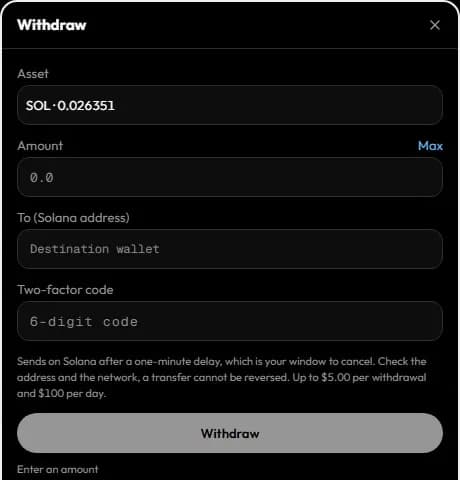
Open Withdraw
Open the wallet (Deposit in the top bar) and choose Withdraw.
Choose the network and asset
Pick the network, then the coin or token to send. You can withdraw:
| Network | Assets |
|---|---|
| Solana, BNB Chain, Base, Ethereum, Robinhood Chain, Arc | The native coin, and tokens you hold whose price Hexa knows |
| Arbitrum One | ETH, USDC |
| Polygon | POL, USDC, USDC.e, pUSD |
Arbitrum One and Polygon appear when an EVM chain is selected in the top bar and your wallet holds a balance on them (for example, funds returned from perpetuals or predictions).
Enter the address and amount
Pick one of your saved addresses, or paste a new one and give it a name (for example "My Phantom"). A new address is added to your list by the same two-factor code that confirms the withdrawal. Then enter the amount.
Hexa refuses an address that isn't valid for the network, the zero address, a Solana program address, or your own Hexa wallet.
Confirm with your two-factor code
Enter the 6-digit code from your authenticator app. Each code works once.
Wait out the delay
The withdrawal waits 60 seconds before it is sent, with a countdown and a Cancel button. If you didn't mean to send it, cancel now. You also get a notification when a withdrawal is requested.
Sent
After the delay Hexa signs and broadcasts the transfer, usually about a minute after you confirmed. The wallet lists each withdrawal with its state and, once sent, a link to the transaction.
Transfers can't be reversed
Once a withdrawal leaves the delay, it can't be cancelled, and a blockchain transfer can't be undone. Check the network and address carefully; funds sent to a wrong address or an unsupported network are lost.
Your withdrawal addresses
Funds leave Hexa only to addresses you saved. Someone who gets into your session can't send your funds to a new address without your authenticator.
- One list per wallet type. An EVM address works on every EVM network; a Solana address on Solana. You can save up to 20 of each.
- Adding needs a two-factor code. Add an address while withdrawing to it, as above.
- Removing needs no code. Use the × next to a saved address in the Withdraw form. A removed address can't receive withdrawals until you add it again.
- You're told about every change. Hexa notifies you when an address is added or removed. If you didn't do it, remove the address and secure your account.
Limits
| Limit | Current value |
|---|---|
| Per withdrawal | $5 |
| Per day | $100, counted from 00:00 UTC across requested, pending and sent withdrawals |
| Safety delay | 60 seconds |
These limits are part of Hexa's gradual launch of live trading and will be raised over time. A withdrawal is also refused if Hexa can't price the asset, or if the amount is more than your balance.
Fees
Hexa charges no withdrawal fee. The network fee for the transfer applies and is taken from the chain's native coin.
Who can withdraw
Only you. A withdrawal is created only by a request from your signed-in account with a fresh two-factor code, to an address in your saved list, and Hexa's signing service sends only a transfer that matches that request exactly, after its delay. Automations (limit orders, copy trading, agents, API keys) can never withdraw or transfer funds. See Security and custody.