Trenches
The live board of new tokens, from launch to bonding-curve graduation, with chain chips, filters and one-click buys.
Trenches is Hexa's live board of newly launched tokens. Cards arrive in real time as tokens launch, climb their bonding curve and migrate to a full trading pool.
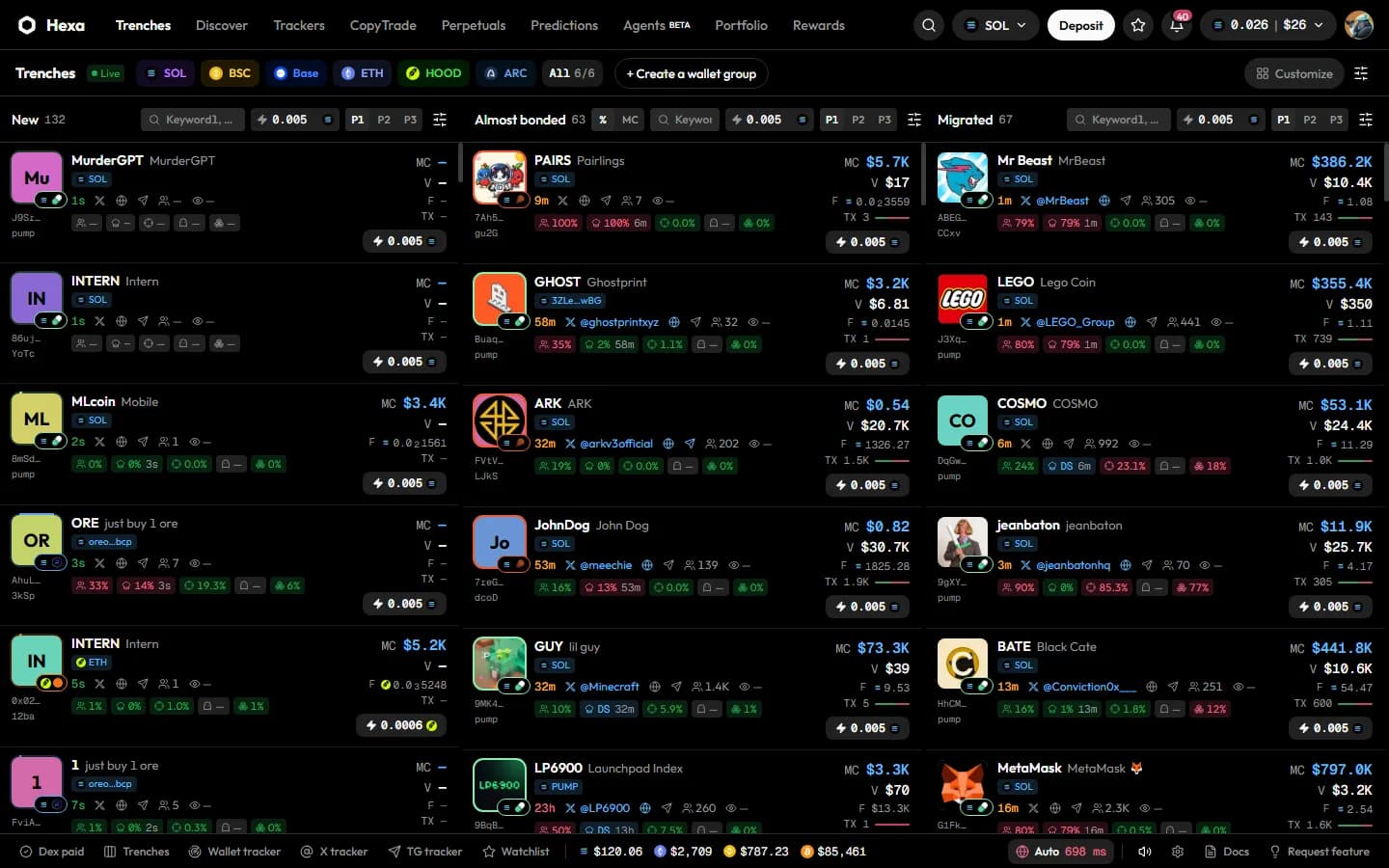
The three columns
| Column | What it shows |
|---|---|
| New | Tokens launched in the last 24 hours, newest first |
| Almost bonded | Tokens whose bonding curve is at least 70% complete. Sort by curve % or by market cap (MC) |
| Migrated | Tokens that have graduated from the curve to a regular pool |
On a phone the columns become tabs: New, Bonding and Migrated.
Pause on hover
When you hover over a column, it stops moving and shows Paused, so a card doesn't slide away just as you go to click it. Move the pointer away to resume.
Chains
The chips at the top choose which chains feed the board: SOL, BSC, Base, ETH, HOOD (Robinhood Chain) and ARC (Arc), or All. Each chain shows the launchpads Hexa tracks there, for example pump.fun, LaunchLab and Meteora DBC on Solana, four.meme on BSC, and Zora, Clanker, Flaunch and Doppler on Base. Which launchpads appear can change as coverage grows.
Reading a card
Each card packs the signals traders check first:
- Image, ticker and name, with the chain and launchpad badge. The ring around the image fills as the bonding curve progresses; hover the image for a large preview, or click it to search the image with Google Lens.
- Age (green under a minute, amber under an hour), links to the token's X, website and Telegram, the number of holders and of pro traders.
- Holder risk tags: top-10 holders' share, the developer's holding (or DS once the developer has sold), snipers, insiders and bundlers. They turn amber or red as concentration rises.
- Paid when the token's DexScreener profile is paid, and the market cap (MC) on the right.
Right-click a card (long-press on touch) to copy the contract address or name, search the name on Google News or X, or search Hexa by name or ticker. Click the card to open the token page.
One-click buy
The ⚡ button on a card buys immediately with your ⚡ amount and the active preset. There is no confirmation.
- Set the ⚡ amount for each chain in the column header (the chain icon next to the field switches chain), or under Customize → Buy amounts.
- The active preset (P1, P2 or P3) is picked in the column header too.
Filters
Open Filters to narrow each column. Filters are set per column (New, Almost bonded, Migrated):
- Keywords: search keywords and exclude keywords in the name or ticker, and search by X handle.
- Launchpads: choose which launchpads to show.
- Quote tokens: SOL, USDC, USD1, BNB, ETH or others.
- Audit: LP burnt, no mint authority, no blacklist, not a honeypot.
- Developer: dev still holding, or dev sold everything.
- Socials: has an X account, more than 1K followers on X, mentioned by a KOL.
- Ranges: bonding curve %, age, market cap, volume, total holders and top-10 holding, each with a minimum and maximum.
Press Apply to use the filters. To keep a set, press Save, name it and choose Save set; saved sets follow your account to other devices (up to 50) and live under Saved, where you can load, apply or delete them. Export and Import move filter sets as a file.
Customize
Customize controls the layout: which Columns are shown, which Chains feed them, and the Buy amounts for ⚡. Reset layout restores the defaults.
Wallet groups
+ Create a wallet group combines several of your own Solana wallets so one order is split across them. See Trading from several wallets. To follow other people's wallets, use Trackers.
Presets, slippage and MEV protection
Three saved trade settings, how slippage is capped, what priority fees and tips do, and how MEV protection works per chain.
Discover and token pages
Find trending tokens, then read a token's chart, holders, top traders, developer history and safety signals before you trade.