Limit, take-profit and stop-loss
Orders that wait for a market cap, a dev sell, a migration or a time, and exits that protect a position.
Conditional orders wait on Hexa's servers and fire once when their condition is met, even if you close the tab or go offline. Hexa checks open orders about twice a second.
Solana only, for now
Limit, trigger, ladder, take-profit and stop-loss orders work on Solana tokens. On EVM chains, use market orders.
Before you start: the Orders session
In live mode, an order that fires while you are away needs your permission to trade for you. Grant it once under Settings → Automation · Session keys:
- Choose Orders.
- Set Max per trade, Daily cap and Expires in.
- Press Grant session.
The session can only swap, within the caps you set, until it expires or you press Revoke. Without an active session, Hexa refuses new conditional orders, and an order whose session is gone when it fires fails instead of trading. In simulate mode no session is needed.
Limit orders
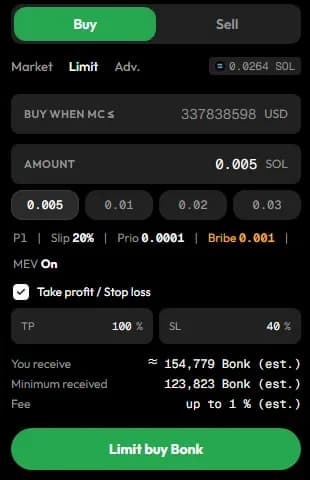
In the trade panel, choose Limit and enter a market cap in USD:
- BUY WHEN MC ≤ buys when the token's market cap falls to your level or below.
- SELL WHEN MC ≥ sells when it rises to your level or above.
Limits trigger on market cap rather than price, because market cap is what Trenches and the chart show for new tokens.
Triggers (Adv.)
The Adv. tab buys when something happens instead of at a price. Pick a TRIGGER:
| Trigger | Fires when |
|---|---|
| MC | The market cap reaches your level |
| Dev sells | The token's creator sells |
| Migration | The token graduates from its bonding curve |
| Time | The date and time you set (AT), which must be in the future |
Dev sells, Migration and Time triggers fill at market when they fire.
Sell ladders
On a buy, tick Sell ladder to plan your exits in advance. Each rung sells a share of the position when the price reaches a multiple of your entry. The default ladder sells 50% at 2× and 25% at 4×.
- Use + Add rung to add a step (it doubles the last multiple, at 25%).
- Up to 10 rungs. Each multiple must be above 1× and higher than the one before, and the shares can add up to 100% at most.
- A ladder without a trigger buys at market now; when the buy fills, the rungs become take-profit orders on the position.
Take-profit and stop-loss
Tick Take profit / Stop loss under the trade panel and set both levels as a percentage from your entry price (they start at +100% and −40%).
- Each one sells the whole position when it fires.
- Together they work as a pair (one-cancels-the-other): when one fills, the other is cancelled.
- On a buy, they are attached once the buy has filled. On the Sell side, they are placed on the position you already hold.
Managing open orders
- The Orders tab under the chart lists the token's open orders: type, trigger, amount and when it was placed, with an OCO marker on paired exits. Press Cancel to remove one.
- Portfolio → Open orders lists them across all tokens.
- Orders stay open until they fire or you cancel them; they do not expire on their own.
Caps apply when an order fires
A conditional buy can't be larger than your per-trade cap, and the Orders session's caps apply on top. See Fees and limits.