Deposits
Fund your Hexa wallet by sending crypto to your own address, or buy with a card where it's offered.
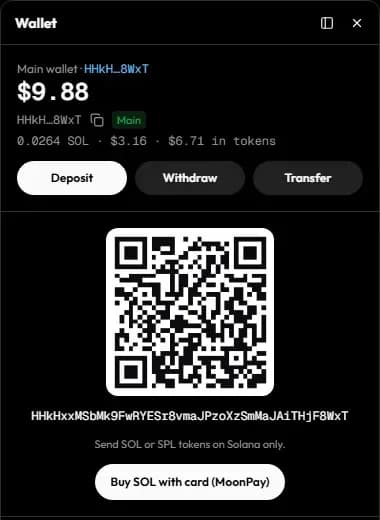
Your Hexa account comes with two wallet addresses: one on Solana and one for all EVM chains (BNB Chain, Base, Ethereum, Robinhood Chain and Arc share the same address). Open the wallet with Deposit in the top bar to see them, with a QR code and a copy button.
Send from another wallet or exchange
Pick the chain
Choose the chain in the wallet panel. For EVM chains the address is the same everywhere, so what matters is the network you send on from the other wallet or exchange.
Copy your address
Copy the address or scan the QR code.
Send
- Solana: send SOL or SPL tokens, on Solana only.
- EVM chains: send the chain's native coin (BNB on BNB Chain, ETH on Base, Ethereum and Robinhood Chain, USDC on Arc) or tokens, on that chain.
Wait for finality
Deposits are credited once they are final on-chain: usually within a minute on Solana and a few minutes on EVM chains. The wallet panel refreshes on its own.
Send on the right network
Funds sent on a network Hexa doesn't support for deposits, or to the wrong address, may be lost. Blockchain transfers can't be reversed. When in doubt, send a small test amount first.
Buy with a card
Where it's enabled, the wallet panel offers:
- Buy with card (MoonPay) for SOL, ETH and BNB, on Solana, Ethereum, Base and BNB Chain.
- Buy or deposit from anywhere (MoonPay Commerce) on Solana: pay by card or with crypto from another chain, and receive SOL in your Hexa wallet, minus MoonPay's fee.
Card purchases are handled by MoonPay, which may ask you to verify your identity. Hexa charges no fee on deposits.
Funding perpetuals and predictions
- Perpetuals are funded with USDC on Arbitrum One (plus a little ETH there for gas), sent to your EVM address. See Perpetuals.
- Predictions use USDC on Polygon (plus a little POL for gas), sent to the same EVM address. See Predictions.
Arbitrum and Polygon balances are used by those venues and can be withdrawn; they don't count towards your spot trading balance.
Simulate mode
When Hexa runs in simulate mode, trades and their balances are simulated and labelled as such, but deposits are always real transfers to your real address.